Alert Configuration
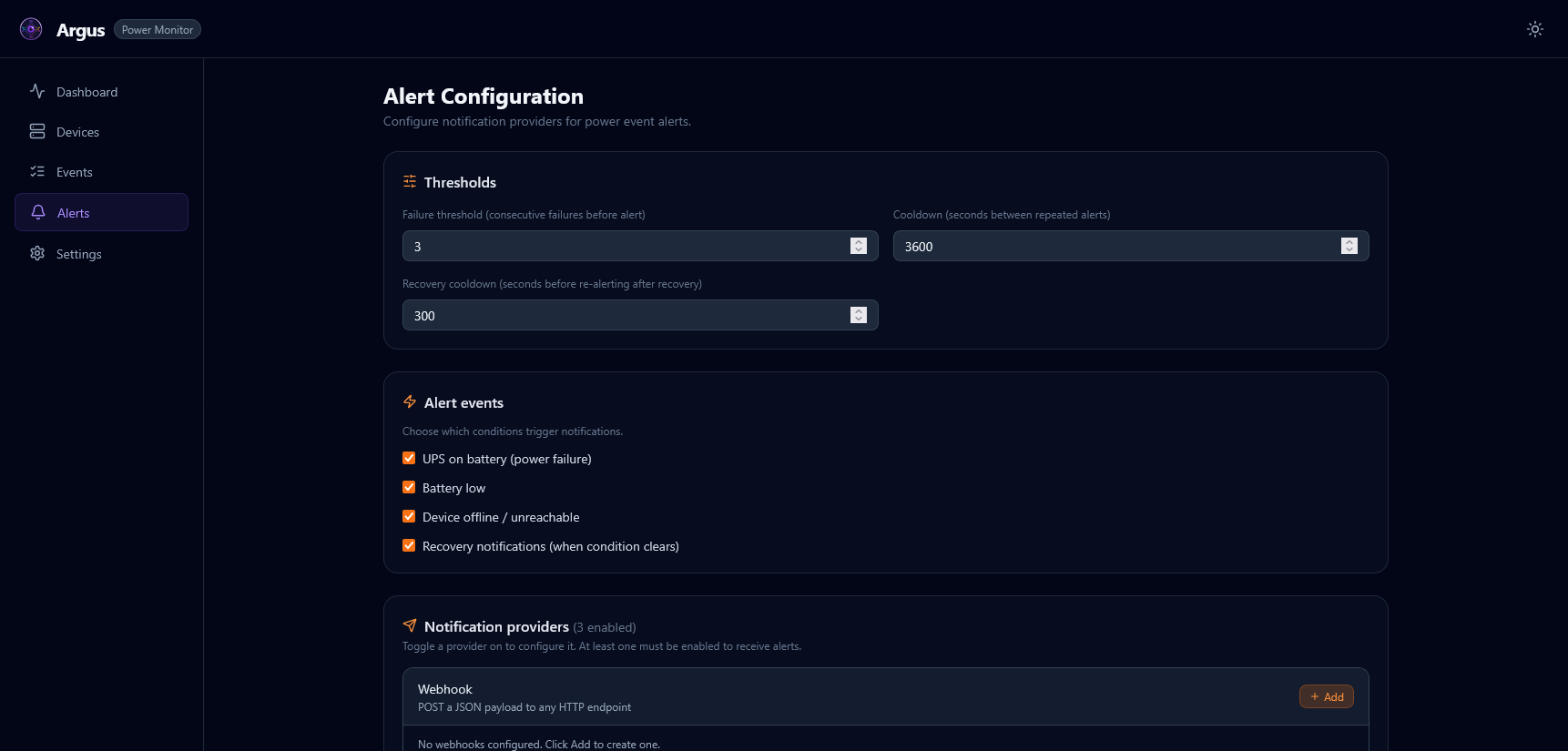
Argus can send notifications when power events occur — UPS battery transitions, device going offline, load/temperature thresholds exceeded, and more. Alerts are configurable via the UI Settings page or environment variables.
📢 Supported Alert Providers
| Provider | Description | Setup Complexity |
|---|---|---|
| Webhook | POST JSON to any HTTPS endpoint | ⭐ Simple |
| Gotify | Self-hosted push notifications (gotify.net) | ⭐⭐ Moderate |
| ntfy | Simple pub-sub notifications (ntfy.sh) | ⭐ Simple |
| Apprise | 100+ services via Apprise API (caronc/apprise-api) | ⭐⭐⭐ Advanced |
⚡ Alert Triggers
Configure which events fire alerts via environment variables:
| Variable | Default | Trigger |
|---|---|---|
ALERT_ON_BATTERY |
true |
UPS switches to battery power |
ALERT_ON_BATTERY_LOW |
true |
Battery charge reaches low threshold |
ALERT_ON_DEVICE_OFFLINE |
true |
Device misses consecutive polls |
ALERT_RECOVERY_NOTIFICATIONS |
true |
Send recovery notification when conditions clear |
ALERT_FAILURE_THRESHOLD |
3 |
Consecutive poll failures before alerting |
ALERT_COOLDOWN_SECONDS |
3600 |
Minimum seconds between repeated alerts for the same device |
⚠️ Alert Severity Levels
Each alert is classified with a severity level. Providers can be configured with a
min_severity filter so high-noise providers only receive critical alerts.
| Severity | Use |
|---|---|
low |
Informational — threshold crossed, minor event |
medium |
Degraded — on battery, device briefly offline |
high |
Serious — battery low, extended offline |
critical |
Imminent data loss — shutdown initiated |
⚙️ Configuration Methods
🖥️ Method 1: UI Settings (Recommended)
- Navigate to Settings → Alerts in the web UI
- Enable desired providers and fill in their settings
- Use “Send Test Notification” to verify before saving
- Click “Save Settings” — changes are written to
runtime_config.jsonimmediately (no restart required)
⚙️ Method 2: Environment Variables
Add to .env before the first container start:
# Triggers
ALERT_ON_BATTERY=true
ALERT_ON_BATTERY_LOW=true
ALERT_ON_DEVICE_OFFLINE=true
ALERT_FAILURE_THRESHOLD=3
ALERT_COOLDOWN_SECONDS=3600

# Provider
WEBHOOK_URL=https://webhook.example.com/argus
Requires a container restart to take effect.
📖 Provider Setup Guides
🪝 Webhook
POST JSON payload to any HTTPS endpoint.
Environment variables:
WEBHOOK_URL=https://hooks.example.com/argus-alerts
Payload example:
{
  "event": "on_battery",
  "device_id": "ups-main",
  "severity": "medium",
  "timestamp": "2026-05-27T10:00:00Z",
  "message": "UPS 'ups-main' switched to battery power."
}
All alert URLs must use
https://. HTTP endpoints are rejected to prevent credential leakage.
📨 Gotify
Self-hosted push notification server.
1. Deploy Gotify:
docker run -d -p 80:80 \
  -v $(pwd)/gotify-data:/app/data \
  gotify/server
2. Create an application in the Gotify UI and copy the token.
3. Configure Argus:
GOTIFY_URL=https://gotify.example.com
GOTIFY_TOKEN=your-app-token
GOTIFY_PRIORITY=5
Priority guide: 1 = low, 5 = normal, 8 = high, 10 = critical.
📱 ntfy
Simple HTTP-based pub/sub for push notifications.
Using ntfy.sh (public):
NTFY_URL=https://ntfy.sh
NTFY_TOPIC=argus-alerts-myhost
Self-hosted ntfy:
docker run -d -p 80:80 \
  -v $(pwd)/ntfy-data:/var/cache/ntfy \
  binwiederhier/ntfy serve
NTFY_URL=https://ntfy.example.com
NTFY_TOPIC=argus-power
NTFY_TOKEN=your-access-token      # optional, for authenticated topics
NTFY_PRIORITY=urgent              # min / low / default / high / urgent
NTFY_TAGS=warning,electric_plug
🌐 Apprise (Recommended for Multiple Recipients)
Apprise supports 100+ services: Discord, Telegram, Slack, Email, SMS, PagerDuty, and more.
1. Deploy Apprise API:
docker run -d -p 8000:8000 \
  -v $(pwd)/apprise-config:/config \
  caronc/apprise-api
2. Create a persistent configuration at http://apprise:8000/add/argus-alerts:
urls:
  - discord://webhook_id/webhook_token
  - tgram://bot_token/chat_id
  - mailto://user:pass@gmail.com
3. Configure Argus:
APPRISE_URL=https://apprise.example.com/notify/argus-alerts
🧪 Testing Alert Configuration
Send a test notification through all currently enabled providers:
Via UI: Settings → Alerts → Send Test Notification
Via API:
curl -X POST http://localhost:8000/api/alerts/test \
  -H "X-Api-Key: your-api-key"
A successful test logs Alert sent successfully via <provider> at INFO level.
🔧 Troubleshooting
| Symptom | Likely Cause | Fix |
|---|---|---|
| No alerts received | Provider disabled or threshold not met | Check UI Settings; verify ALERT_ON_BATTERY=true |
URL must use https:// error |
HTTP URL provided | Use an HTTPS endpoint or self-signed cert proxy |
| Alert fires repeatedly | Cooldown too short | Increase ALERT_COOLDOWN_SECONDS |
| Recovery alert not sent | ALERT_RECOVERY_NOTIFICATIONS=false |
Set to true |
| Gotify: 401 Unauthorized | Invalid token | Recreate the Gotify application and update the token |
| ntfy: message not delivered | Wrong topic or server URL | Verify NTFY_TOPIC and NTFY_URL |